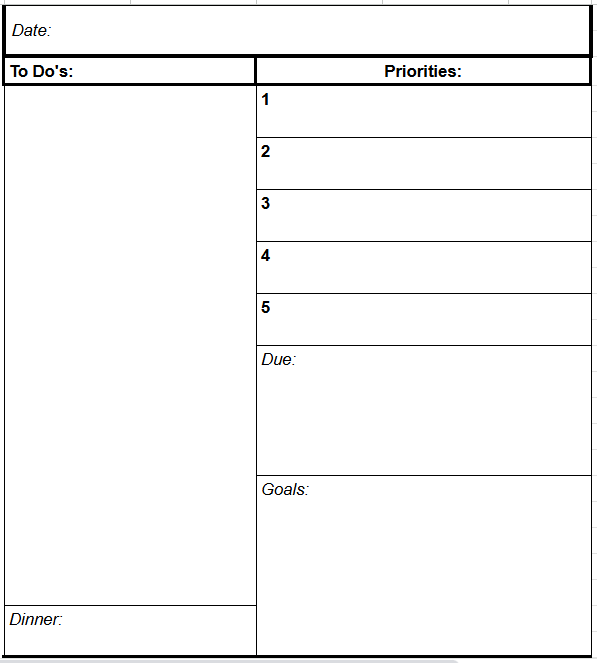
After finding that I struggled to stay on top of my online college assignments starting during the pandemic, I realized that I needed a planner to help me keep track of what was due. What started as a few lines drawn on graph paper turned into something more as I refined the planner as I figured out what I needed to succeed.
Now, I’ve decided to digitize my planner in the hopes of making it available to more people who are struggling to stay on top of their tasks. I started to prototype the planner in Figma. I hope to one day provide an online source for people to have easy access to their planner wherever they are through a website and a phone application.
In the fall of 2020, I was set to start my first semester of college at Utah State University. The majority of my classes were in person even though Covid-19 was still a threat of the recent past or even the present. I was about to move to Logan, UT, when I got an email that informed me that all of my classes would now be conducted over Zoom.
I am not the only student to have had a similar college experience, but now I had to learn to manage all of my learning; my class times, my assignments, and my test dates without having the advantage of having a physical copy of anything. I found that none of the available planner or calendar options had quite the level of organization or detail that I was looking for. So I decided that I would make my own.
My Solution
The First Prototype
Because I couldn’t find a planner that I really liked, I decided to make my own. So I grabbed a piece of graph paper and started to count squares and draw lines
I knew that I needed help prioritizing my assignments, and remembering when things were due. I needed more than a simple to-do list, and I wanted more direction in my planning than most traditional planners offer. That is how all of the different segments of my planner were born.
Refining the Idea
I decided that I could only handle about a month of planning at one time, so I folded 8 sheets of graph paper in half, used my ruler and made 32 days worth of planners. That took a really long time though to do by hand. So I went to Excel to make it easier to replicate every month through a printer.
The design didn’t change very much. I decided to get rid of the calendar view because I didn’t use it very much. I adjusted the sizes of the boxes and made it so that I could print two of these on one side of a sheet of paper.
Making It Last
Small packets of paper don’t last very long, so I decided to make a reusable cover for my planner. Using some leather and my uncle’s laser, I designed a simple protector for my loose sheets of paper. The leather adds a layer of protection and it looks nice too.
After School
I used the same style of planner all through my college experience. But after I graduated, I was talking to a relative who was about to start college, with several online classes. She was feeling worried about how she was going to stay on top of things, so I showed her my planner.
As I was talking to her, I realized that my planner had potential as an app or website that sends reminders and notifications, shows daily progress on task completion, and is accessible from wherever you are and on whatever device. So I started to Wireframe.
In my classes, I learned to use Figma to make high fidelity prototypes and wireframes. So I decided that a prototype to show what I was planning and test with users was a good place to start.
This wireframe is one of my many current, personal projects that I am working on. That means that progress can be slow sometimes. Even though it is slow going, I enjoy conducting user tests and improving my prototype
The Future
I plan to continue working on this prototype until I have something that I could turn into an app. Once the prototype has been tested and is complete, I plan to find someone willing to turn my prototype into functional code and an app that can release on Apple ios and Android software.